Purpose‑built to enhance SAP Business One workflows with AI, automation, and secure access — powered by Consensus International.
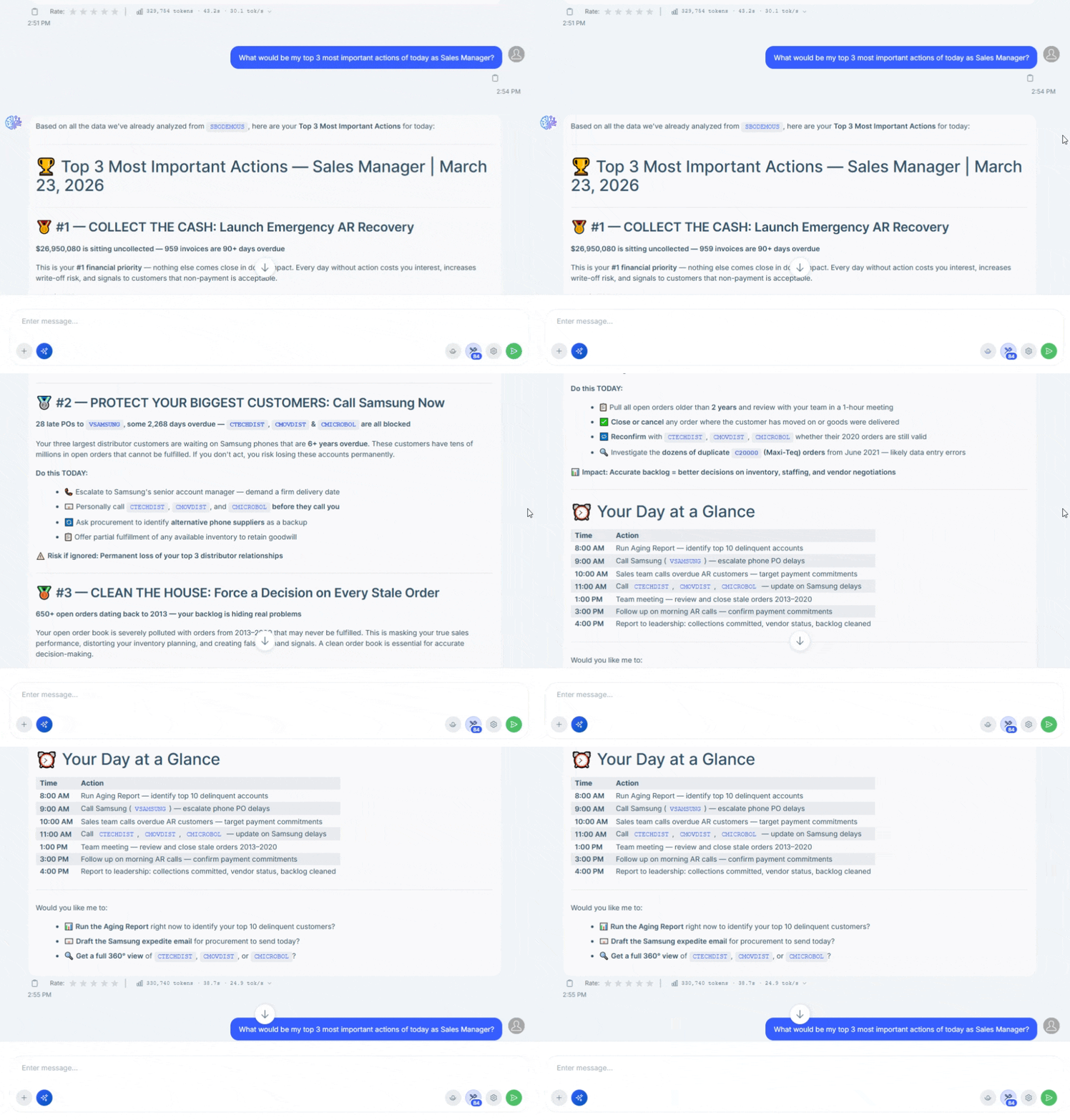
AI Assistant
Your Intelligent Business Partner
Chat with an AI bot directly connected to your SAP Business One database. Retrieve
information instantly, generate insights, and even create transactions through natural
language conversations.
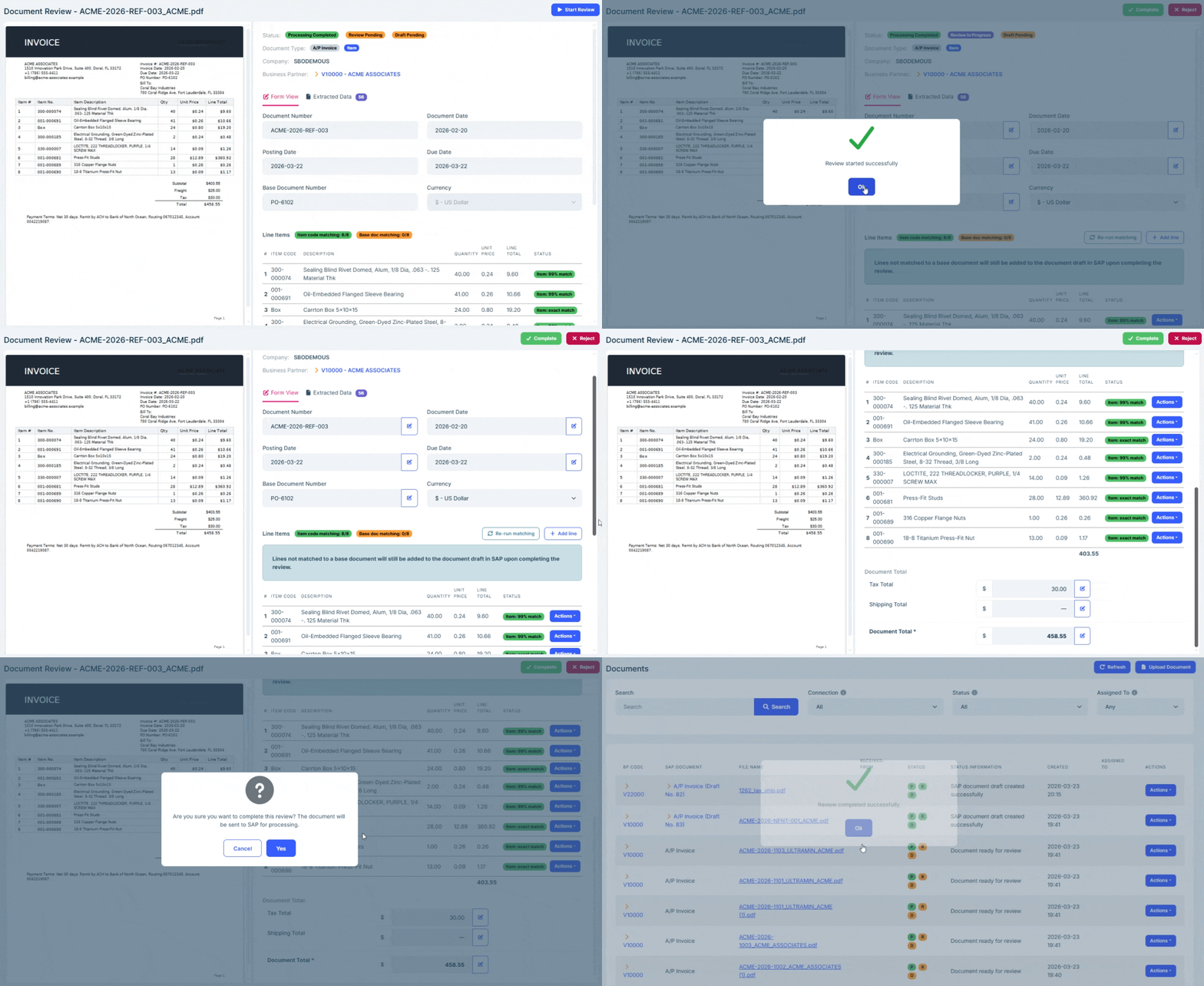
Turn PDF invoices and purchase orders into SAP Business One documents automatically. AI extracts key information with precision to speed up accounts payable and eliminate manual data entry.
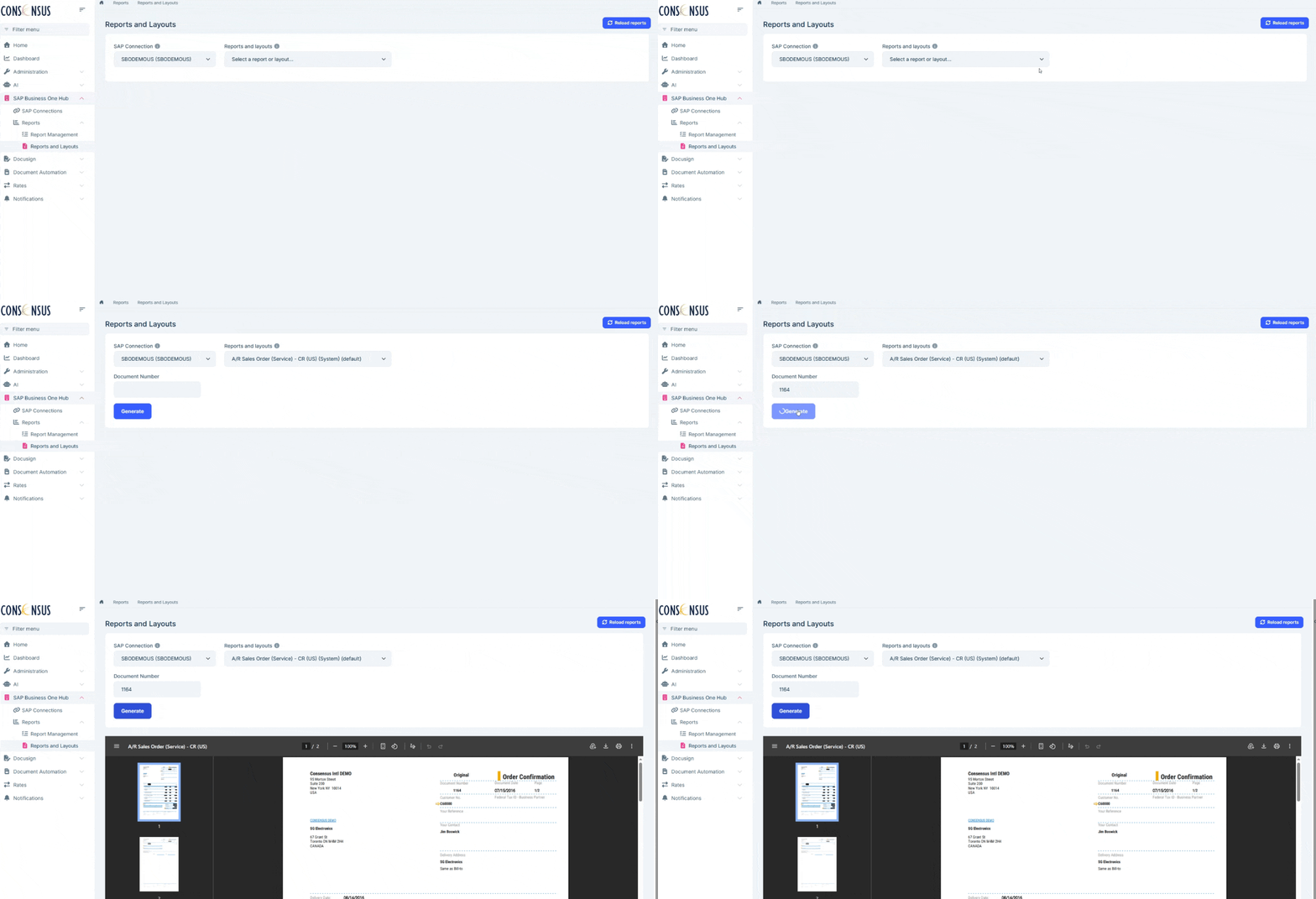
Share selected SAP Business One documents and reports with CloudApps users through a secure browser interface. Provide real-time visibility with granular, view-only access — without exposing your SAP system.
Leverage your DocuSign account to send SAP Business One documents for electronic signature directly from the ERP. Signature completion and audit details are automatically recorded back in SAP.
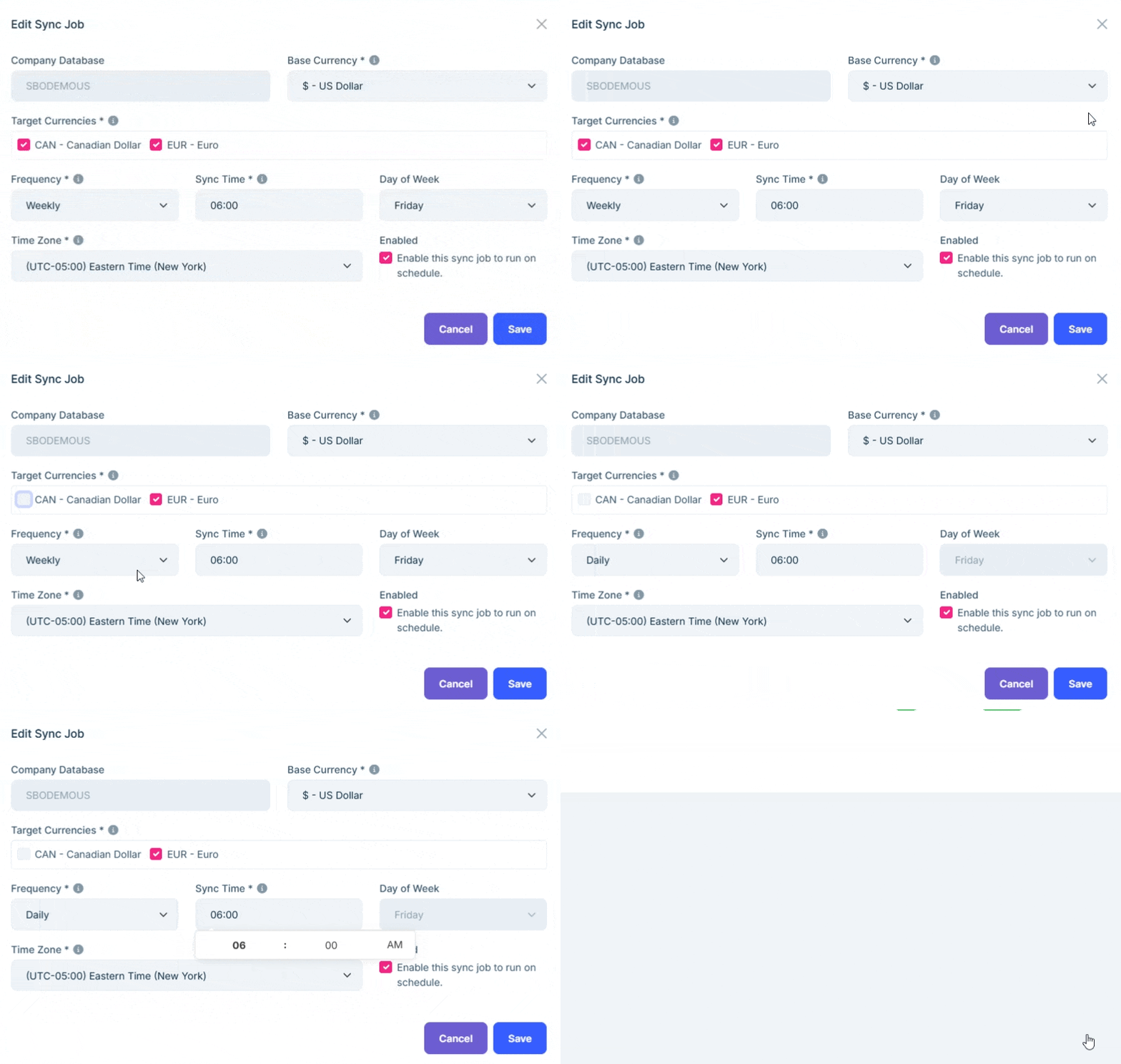
Ensure SAP Business One always uses the latest exchange rates from trusted sources. Control update frequency and currency pairs to support global, multi‑currency business operations.
Purpose-built specifically for SAP Business One, with native integration and a deep understanding of B1 processes and workflows.
Multi‑Tenant SaaS Architecture
Secure, scalable cloud architecture designed to support multiple organizations while ensuring complete data isolation.
Expert Support
Backed by Consensus International’s proven SAP expertise, with a team that understands both your technology and your business.
Always Up to Date
Cloud-based delivery ensures continuous access to the latest features, improvements, and security updates.
Boost Productivity
Automate repetitive tasks, reduce manual data entry, and free your teams to focus on higher‑value business decisions.
Enterprise‑Grade Security
Designed with bank‑grade encryption, role‑based access control, and alignment with industry security standards.
Your Data Is Protected
We safeguard your sensitive information with robust, enterprise-grade security. CloudApps uses end-to-end
encryption, strict access controls, and comprehensive auditing to ensure your SAP Business One data remains
secure, private, and fully under your control — so you can innovate with confidence.
No training on your data
By default, your data is not shared, used for training AI models, or made accessible to other firms
or third-party AI providers.
Fully encrypted
256-bit AES encryption for data at rest and in transit, stored in a private cloud with the option
for deployment on client-specific cloud infrastructure.
Strict access
ClouApps adopts a zero-trust, least-privilege access model with granular role-based controls.
Audit logging
Track every interaction with comprehensive audit logs. Get compliance peace-of-mind with full
transparency.
Frequently Asked Questions
Everything you need to know about Consensus Cloud Apps
CloudApps is a suite of AI‑powered tools designed exclusively for SAP Business One.
Each tool enhances SAP Business One functionality by automating specific tasks and processes, helping users work faster and more efficiently.
CloudApps is AI at the service of SAP Business One users, with tools purpose‑built for SAP Business One workflows and data structures.
CloudApps is a suite of tools, organized into subscription tiers.
When you subscribe to CloudApps, you gain access to all tools included in your selected tier.
Tools are not available individually.
If one specific tool brought you here, we encourage you to explore the rest of the tools in your tier—many customers discover additional value and efficiencies they didn’t initially expect.
Unlike generic AI platforms, CloudApps works only with SAP Business One. This is a key competitive advantage because:
Connectivity to SAP Business One is native and seamless
No third‑party or generic integrations are required
Tools are designed around real SAP Business One processes
CloudApps is developed by the Consensus International Development team, who are experts in SAP Business One, ensuring the AI understands its generic scenarios and your data.
No. CloudApps tools are not available individually.
CloudApps is offered as a bundle of tools per tier.
One subscription provides access to multiple AI‑powered tools designed to work with SAP Business One.
To connect CloudApps to your SAP Business One system, one SAP Business One indirect license is required.
Important notes:
Only one indirect license is needed
All tools in your CloudApps tier share the same access
No additional licenses are required per tool or per user
You may already have an available indirect license in your SAP Business One license inventory.
Your Consensus Account Manager can confirm this or help you obtain one if needed.
CloudApps connects to SAP Business One using a single SAP Business One indirect license.
Because of this architecture, CloudApps does not know which SAP Business One user is logged in at any given moment.
As a result:
SAP Business One user license types do not determine access
SAP authorization structures do not control CloudApps behavior
Instead, CloudApps uses its own granular authorization framework, designed specifically for AI‑driven tools.
✅ This is intentional
✅ This is secure
✅ This is a major advantage
This approach allows CloudApps to deliver:
Precise, role‑based access control
Simpler governance and auditing
Freedom from SAP license complexity
No dependency on SAP role inheritance
Access is explicit, intentional, and purpose‑built for CloudApps—rather than inferred from SAP license types.
CloudApps authorizations are highly granular and managed independently from SAP Business One.
The administrator controls:
Which users can access CloudApps
Which tools each user can use
What data users can see
What actions the AI assistant can perform
✅ No over‑permissioning
✅ No accidental exposure
✅ Clear governance and accountability
No.
What matters is:
The CloudApps authorization assigned to the user
The permissions configured by the CloudApps Administrator
This simplifies access management while maintaining strong security.
No.
CloudApps ensures that:
Users can only request actions they are explicitly authorized for
The AI assistant is constrained by CloudApps permissions
Unauthorized actions are blocked
This protects your system from misuse and unintended changes.
Each company assigns a CloudApps Administrator.
The CloudApps Administrator:
Defines who can use CloudApps
Assigns access per user
Controls permissions per tool
Determines what the AI assistant is allowed to see and do on behalf of each user
Because CloudApps uses a single indirect license, this authorization setup becomes critical and is the primary security control mechanism.
CloudApps is designed for fast deployment.
Most modules can be deployed within minutes once the SAP Business One proxy module is securely connected
This secure connection is typically completed within 24 hours of trial sign‑up, provided an SAP Business One indirect license is already available. If a license needs to be provisioned, the connection timeline will begin once the license is in place.
Tools like the AI Assistant are ready to use immediately after administrator configuration.
Other tools, such as Document Automation, may take longer due to:
Granular setup options
User and tool‑level authorization configuration
Preference and rule definitions
This ensures everything is aligned with your processes and security requirements.
1. Trial request is submitted
2. SAP Business One deployment is validated. Indirect license is available.
3. Secure connection to the SAP Business One company is established
4. Access to CloudApps tools is granted
5. Tools can be used for 15 days
6. At the end of the trial, you can either:
Subscribe to a CloudApps tier, or
Discontinue use of the tools
Absolutely.
CloudApps uses:
Bank‑grade TLS encryption for data in transit and at rest
Secure processing without storing core SAP Business One business data
Data is processed only to deliver the requested services and always within defined permissions.
No.
While CloudApps does not rely on SAP user licenses, it enforces:
Explicit CloudApps permissions
Controlled AI behavior
Strict data visibility rules
This provides stronger and more transparent governance than traditional models.
No heavy infrastructure is required.
All core CloudApps logic runs in Consensus’ secure cloud environment.
Yes.
The Consensus development team continuously builds new tools, integrations, and enhancements.
New tools may be added to CloudApps tiers over time.
💡 Have an idea?
Send it to ideas@consensusintl.com
Each tool includes extensive configuration options.
However:
Tools cannot be customized for individual customers
This ensures stability, scalability, and consistent upgrades
If a missing feature would benefit the broader community, submit an idea to ideas@consensusintl.com.
CloudApps is available in three subscription tiers:
✅Lite
✅Standard
✅Scale
Most CloudApps tools are available across all tiers, with differences in access levels, usage limits, and capacity.
Key differences between tiers may include:
Number of total users
Number of SAP Business One companies that can be connected
Usage or access levels per tool
Number of external or guest users (for tools such as the Report and Layout Hub)
If the Scale tier does not fully meet your company’s size or requirements, please contact your Consensus Account Manager. Customized solutions and quotes are available for larger or more complex environments."
Upgrades can be requested at any time.
Downgrades or subscription cancellations are only possible at the time of renewal.
Your Consensus Account Manager can help you evaluate the best tier as your needs evolve.
CloudApps pricing is tier‑based.
Pricing is determined by the selected tier, which defines:
The tools included
Usage limits
User and company capacity
Tools are not priced or sold individually.
CloudApps is billed annually.
Annual billing ensures:
Predictable costs
Continuous access to all tools in your tier
Ongoing updates, enhancements, and new tool releases
Yes. CloudApps uses generative AI to assist users with automation, analysis, and task execution within SAP Business One, always operating within defined authorization boundaries.
No. CloudApps does not train or learn from your company’s data; your data is processed only to provide the requested functionality and is not retained for model training purposes.
Yes. AI‑generated outputs and actions can be reviewed, validated, and governed according to your internal processes, supporting auditability and accountability.
CloudApps cannot fully prevent AI hallucinations or incorrect responses, as this is a known limitation of generative AI technologies. For this reason, CloudApps is designed so that AI outputs do not act autonomously and do not bypass system controls.
Ready to Transform Your Business?
Join businesses already leveraging the power of Consensus Cloud Apps for SAP Business One.